The Planning Data API gives you access to over 100 planning and housing datasets for England through a single, consistent interface – from conservation areas and listed buildings to brownfield land and planning applications.
About the data
Most of the data on the platform is available under the Open Government Licence, meaning anyone can view, build services using the data or download and analyse the data to inform planning and other decisions. Attribution and licensing terms are documented against each dataset.
This product is still in development, so the data may be incomplete and does not yet cover all of England.
Getting started
This guide shows how to use it for typical property and planning tasks.
1. Check planning constraints for a location
You want to find specific planning considerations that apply to a specific address or site - conservation areas, listed buildings, flood risk zones, Article 4 directions, and so on.
Query by coordinate
Pass a latitude and longitude to return all entities whose geometry intersects that point.
Specify the datasets you care about.
GET /entity.json
  ?latitude=51.5074
  &longitude=-0.1278
  &dataset=conservation-area
  &dataset=listed-building
  &dataset=green-belt
  &dataset=flood-risk-zone
  &dataset=article-4-direction-area
  &dataset=tree-preservation-zone
  &limit=100
You can pass multiple dataset parameters. The API returns entities from any of those datasets whose
geometry covers the point.
Query by UPRN
If you have a Unique Property Reference Number, pass it using the q parameter. This is more precise
than a coordinate for registered properties.
GET /entity.json?q=10008315764&dataset=conservation-area&dataset=listed-building&limit=100What you get back
Each entity includes name, dataset, start-date, geometry (WKT), and
point (WKT), plus other fields. Show constraints grouped by dataset and make clear to users that an
absence of results does not mean no constraints exist - data coverage varies by area.
2. Find development sites in an area
You want to find all brownfield land or planning activity within a specific local planning authority.
Find a local planning authority
Fetch all 337 LPAs with their entity IDs in one request, then filter by name in your application:
GET /entity.json?dataset=local-planning-authority&limit=500&field=name&field=entity
For example, Lambeth LPA has entity ID 626195. Use this in subsequent spatial queries.
Find brownfield land within that boundary
Use geometry_entity to filter by the LPA's geometry rather than pasting in a raw polygon.
GET /entity.json
  ?dataset=brownfield-land
  &geometry_entity=626195
  &geometry_relation=within
  &limit=100
Find recent planning applications
Note: the planning applications data standard is currently in development and may change. Stay up to date with developments.
Get applications within the LPA boundary:
GET /entity.json
  ?dataset=planning-application
  &geometry_entity=626195
  &geometry_relation=within
  &limit=100
Or filter all applications by start_date (when the application was submitted):
GET /entity.json
  ?dataset=planning-application
  &start_date_year=2022
  &start_date_month=1
  &start_date_day=1
  &start_date_match=after
  &limit=100
3. Research heritage and environmental designations
You want a structured view of statutory heritage and environmental designations for a specific property.
Query by UPRN
Pass a UPRN using the q parameter to return all matching entities for that property.
GET /entity.json
  ?q=10008315764
  &dataset=listed-building
  &dataset=conservation-area
  &dataset=scheduled-monument
  &dataset=site-of-special-scientific-interest
  &dataset=ancient-woodland
  &dataset=flood-risk-zone
  &dataset=heritage-at-risk
  &dataset=area-of-outstanding-natural-beauty
  &limit=100
Listed building entities include a listed_building_grade field (Grade I, II*, or II). You do not need a
separate query to get this.
4. Monitor new planning applications
You want to monitor new planning applications within a geography or track activity over time.
Query recent applications
Use start_date to filter by when a planning application was submitted.
GET /entity.json
  ?dataset=planning-application
  &start_date_year=2022
  &start_date_month=1
  &start_date_day=1
  &start_date_match=after
  &limit=100
  &offset=0
Search within a custom area
Pass a polygon in Well-Known Text format to the geometry parameter. Spaces in the WKT string must be
percent-encoded but most HTTP client libraries handle this automatically.
GET /entity.json
  ?dataset=planning-application
  &geometry=POLYGON((-0.15%2051.50,-0.10%2051.50,-0.10%2051.52,-0.15%2051.52,-0.15%2051.50))
  &geometry_relation=intersects
  &limit=100
Coordinates should be in WGS84 (EPSG:4326).
Paginating results
Use offset to page through large result sets. Increment it by your limit value for each
subsequent request.
GET /entity.json?dataset=planning-application&limit=100&offset=0   # page 1
GET /entity.json?dataset=planning-application&limit=100&offset=100  # page 2
The response includes a links object with pre-built next, prev, first,
and last URLs, so you can follow pagination without calculating offsets manually.
5. Screen a portfolio against planning risk
You want to check a list of properties against planning designations to flag potential risk.
Query per property
The API does not have a batch endpoint. Issue one request per property. Use the field parameter to
limit the response to what you need.
GET /entity.json
  ?latitude=52.5306
  &longitude=-1.9561
  &dataset=flood-risk-zone
  &dataset=conservation-area
  &dataset=article-4-direction-area
  &dataset=green-belt
  &field=name
  &field=dataset
  &field=reference
  &limit=50
Apply polite rate-limiting between requests.
Use bulk downloads for large portfolios
For hundreds of properties or more, download datasets in bulk and run spatial intersections locally. This avoids rate limits and gives you a stable snapshot.
Datasets are available as CSV, GeoJSON and Parquet from each dataset's page on planning.data.gov.uk/dataset. Download links are listed on each individual dataset page - the URL format varies by dataset.
Resources and support
Documentation
- API: learn how to access our data through an API
- Datasets: see all available planning datasets
- Dataset specifications: understand the schema and structure of each dataset
- Team handbook (work in progress): get insights into how we work and build the platform
Code
Explore our repositories to understand how the platform works, integrate with our tools, or contribute directly.
The code behind the Planning Data platform is available as open source. The team work in the open at github.com/digital-planning and welcome contributions:
- digital-land.info: the planning.data.gov.uk application
- specification: where we manage our specifications
- config: where we configure our data sources and data pipeline
- digital-land-python: our data pipeline which collects from planning authorities and transforms it into our datasets
- check and provide data: the application where we give feedback to planning authorities providing data
- design: how we discover and co-design datasets for the platform
Local plans
Local plans set out the vision and framework for future development. Accessing this data can help you understand future housing targets and development strategies across different regions.
We are in the process of developing a specification for LPAs to provide data about their local plan, with some data on the platform:
Tools and examples
This section highlights existing tools and projects that utilise planning data, offering inspiration and practical examples for your own work.
- backups of the considerations Postgres database: underpins various planning analyses
- planning applications submissions: learn about the group defining standards for planning application data
- land calculator: a tool to estimate land capacity
- Barnet conservation areas: see a real-world application of the data in local conservation efforts
- Digital Planning project: includes an example of how to use planning data to create a SVG choropleth map
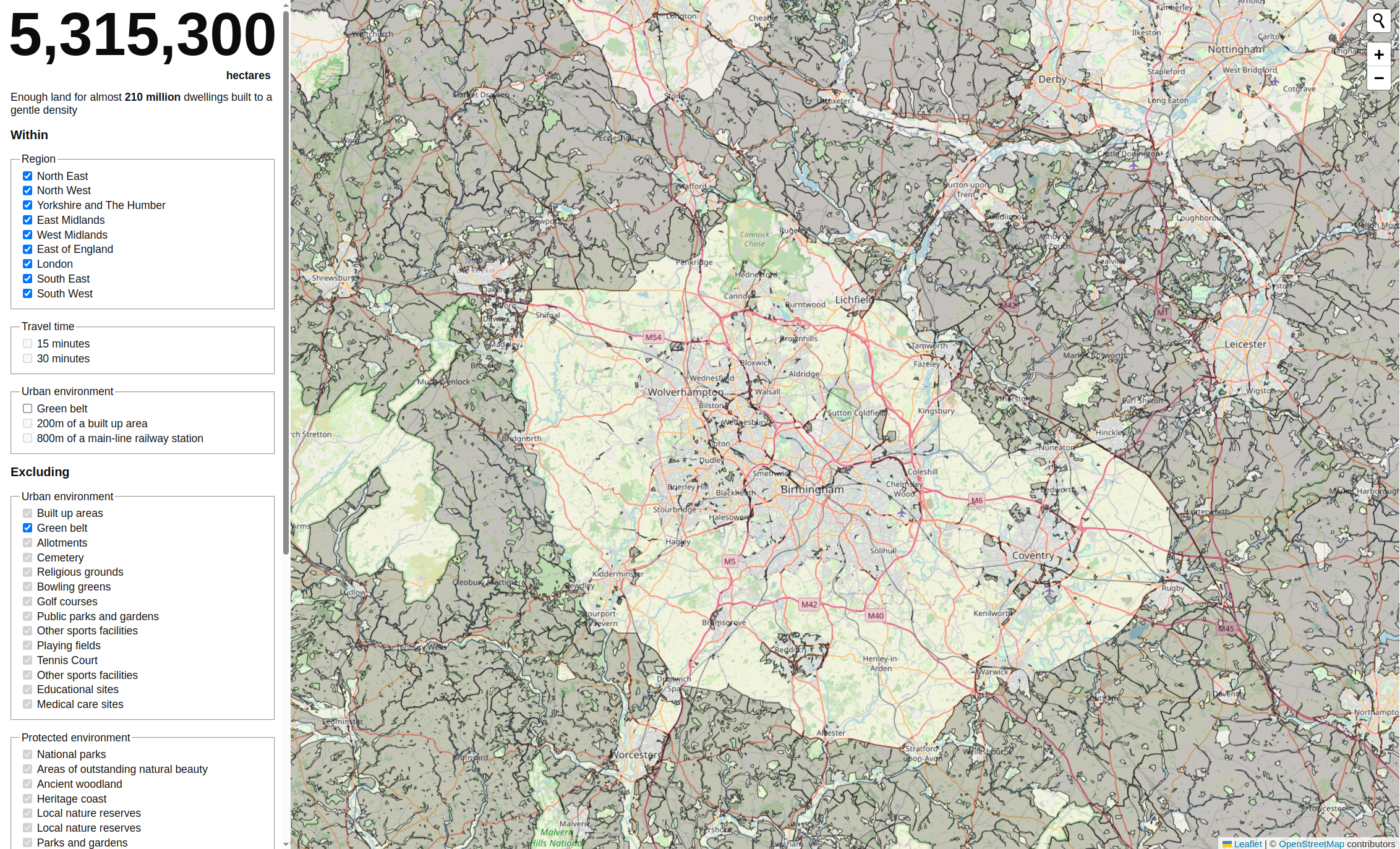 Caption: A screenshot from land calculator
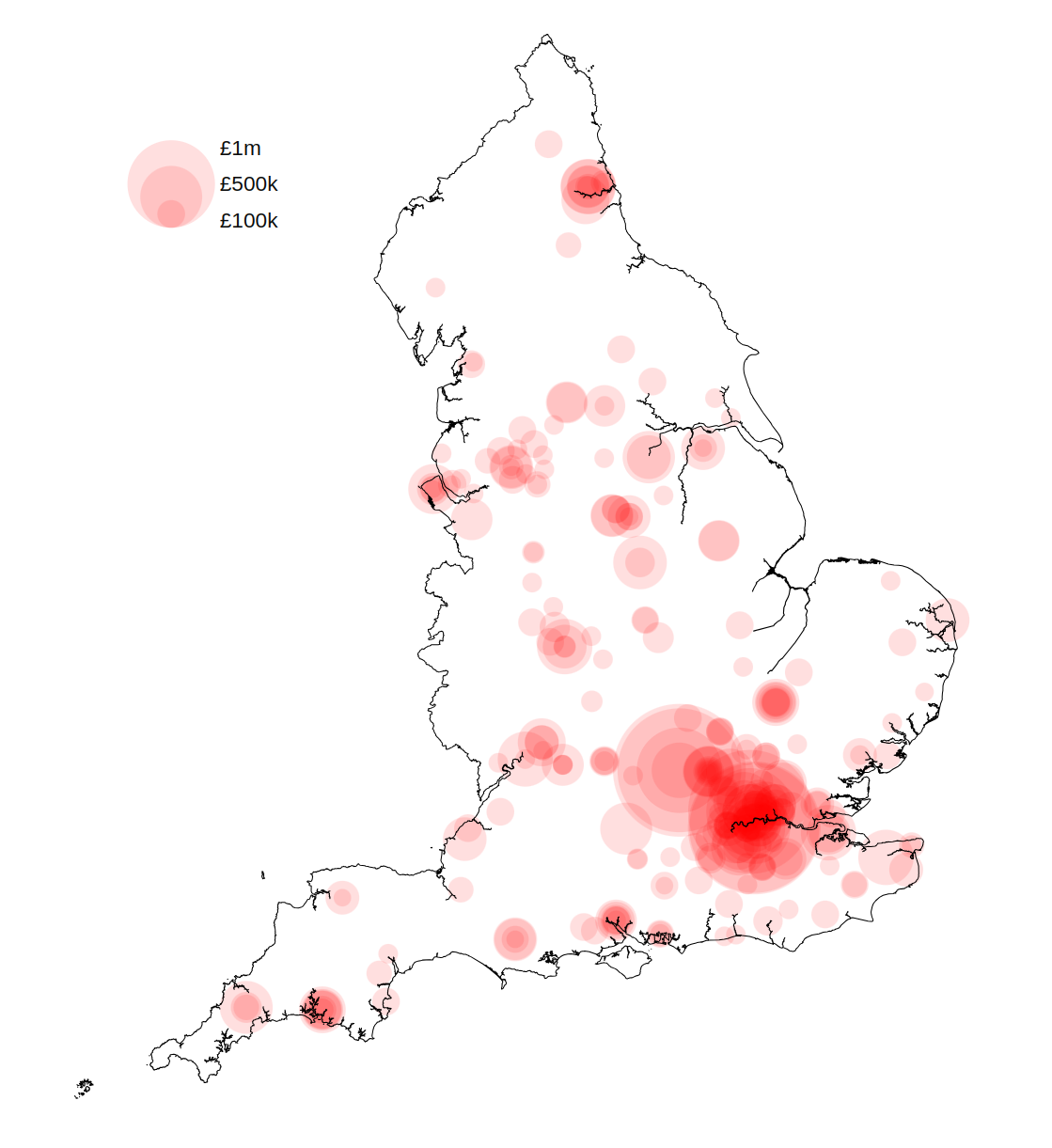 Caption: A proportional symbol map showing the scale of the digital programme funding in different LPA areas in England.
Where we get our data from
Local Planning Authorities
Local planning authorities (LPA) are the primary decision-makers in the planning system, and their consistent data is foundational to the platform.
In England, a local planning authority is an organisation responsible for planning within an area. Organisations who act as the LPA include some, but not all local authorities, National Park Authorities and Development Corporations.
Selecting and filtering role-organisations with the role local-planning-authority and a blank end-date the current list of
active local planning authorities.
Organisations
Organisations are important as they are the source and context for much of the planning data.
Our data includes ONS / GSS codes (nine-character codes maintained by the UK's Office for National Statistics (ONS) to represent various geographical areas of the UK) for the local authority district, national park area, local planning authority boundary, and other geographies. Along with Wikipedia, Wikidata is useful when reconciling data from different sources.
ONS / GSS codes help you link planning data to broader geographical and statistical information for richer analysis.
Contribute to the Planning Data Platform
We work in the open, and welcome your feedback and contributions. You can help:
- identify missing data, and inform the design of the datasets we put on the platform by participating in the data design process
- prioritise our work by commenting on our project backlogs
- improve this guidance through by making a pull-request to the quickstart repository or participating in the quickstart GitHub discussion