Processing of Geometries
This document explains the steps that geospatial boundary data goes through between being submitted by a Local Planning Authority (LPA) and appearing on the Planning platform at planning.data.gov.uk.
It is intended for both internal staff and for LPAs or councils who want to understand why a boundary they submitted may look slightly different on the platform.
Background
When an LPA publishes geospatial data — for example, conservation area boundaries, listed building outlines, or Article 4 direction areas — we ingest it into the Planning Data pipeline. During that process, the raw geometry is transformed to ensure it is in a consistent, valid, and web-friendly format.
Some of these transformations are purely administrative (e.g. converting coordinate systems), but others are designed to fix common geometry defects and can result in a visible difference between the original submission and what is shown on the platform.
The Pipeline at a Glance
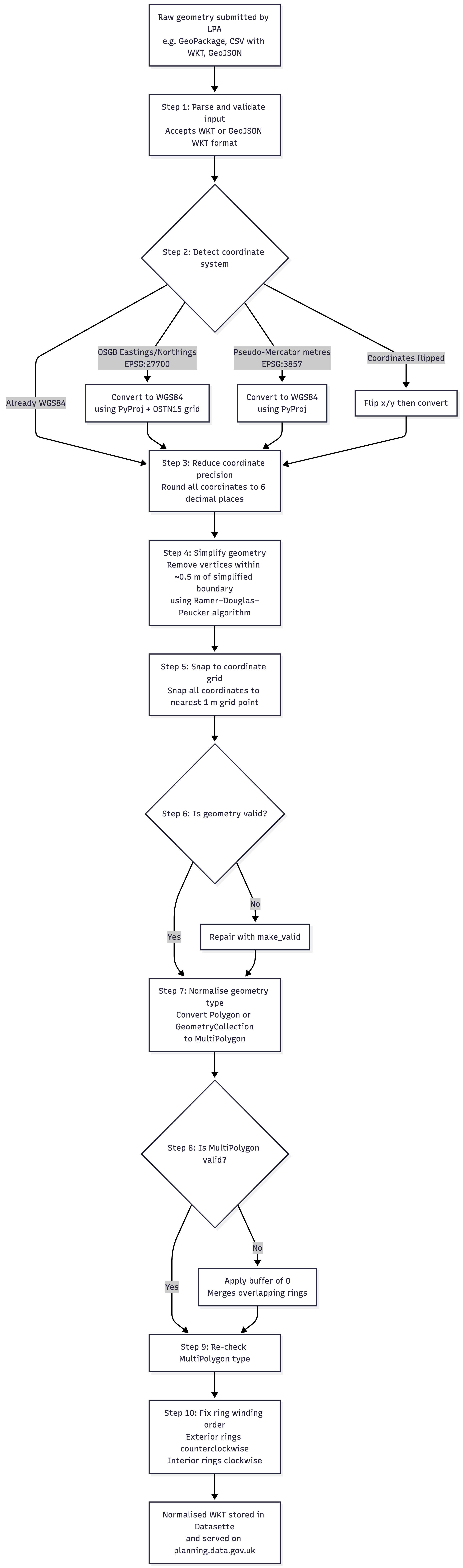
Step-by-Step Explanation
Step 1 — Parse and validate input
The pipeline accepts geometry as Well-Known Text (WKT) or as a GeoJSON geometry string. If the input cannot be parsed as either format, the record is rejected and an issue is logged.
Step 2 — Detect and convert coordinate system
Submitted data can use different coordinate reference systems (CRS). The pipeline inspects the magnitude of the raw coordinates to detect which system is in use, then converts everything to WGS84 (longitude/latitude, EPSG:4326), which is the standard used by web mapping and the platform.
| Detected CRS | Conversion applied |
|---|---|
| WGS84 (EPSG:4326) — degrees in range ±60 | No conversion needed |
| British National Grid / OSGB (EPSG:27700) — Eastings/Northings | Converted using PyProj + OSTN15 correction grid |
| Pseudo-Mercator (EPSG:3857) — metres | Converted using PyProj (no datum shift needed — same ellipsoid) |
| Any of the above with x/y axes swapped | Axes are flipped before conversion |
If the coordinates cannot be matched to any known system, or if the resulting point falls outside England, the record is rejected.
Step 3 — Reduce coordinate precision to 6 decimal places
Every coordinate in the geometry is rounded to 6 decimal places. At UK latitudes, 6 decimal places corresponds to roughly 11 cm of precision. This prevents very high-precision coordinates (which can be an artefact of coordinate conversion) from undermining the validity repairs that follow.
This step is lossier for data that has been converted from OSGB, because the conversion produces coordinates with many decimal places that are then truncated. For data already in WGS84, the change is smaller.
Step 4 — Simplify the geometry
The pipeline applies Ramer–Douglas–Peucker simplification with a tolerance of 0.000005 decimal degrees (approximately 0.5 m). Any vertex that lies within 0.5 m of the straight line between its two neighbours is removed. This reduces the number of vertices stored and helps resolve near-collinear vertices that can cause validity errors, particularly in data that has been converted from OSGB or Mercator.
Note: Increasing the coordinate precision (e.g. from 6 to 7 or 8 decimal places) does not reduce the impact of this step — it makes it slightly worse, because finer coordinates give the simplifier more vertices to evaluate and remove.
Step 5 — Snap coordinates to a 1 m grid
After simplification, all coordinates are snapped to the nearest point on a 0.000001 decimal degree grid (roughly 1 m spacing). This is a second precision-reduction step and helps ensure that nearby vertices that are geometrically near-identical are merged, which can prevent self-intersection errors.
Step 6 — Repair invalid geometry
If the geometry is invalid at this point (e.g. self-intersecting rings, duplicate vertices), the pipeline applies Shapely’s make_valid function to produce a valid geometry. The nature of the original invalidity is logged as an issue.
For most well-formed submissions this step is skipped. It is most commonly triggered by geometries that have been converted from OSGB and contain near-collinear or overlapping vertices.
Step 7 — Normalise to MultiPolygon
The platform stores all polygon geometries as MultiPolygons (a single geometry type that can represent one or more polygons). This step converts:
- A single
Polygon→MultiPolygoncontaining one polygon - A
GeometryCollection→MultiPolygonextracting only the polygon members
This is a lossless structural change; no coordinates are altered.
Step 8 — Buffer repair for invalid MultiPolygons
If the MultiPolygon produced in Step 7 is still invalid — which can happen when simplification causes overlapping rings within a geometry collection — a buffer(0) operation is applied. This merges overlapping rings and typically resolves the remaining invalidity.
Step 9 — Re-check MultiPolygon type
The buffer operation can sometimes convert a MultiPolygon back to a single Polygon. This step re-wraps the result in a MultiPolygon if necessary.
Step 10 — Fix ring winding order
The OGC specification for WKT requires that exterior rings are oriented counterclockwise and interior rings (holes) are oriented clockwise. The pipeline enforces this using Shapely’s orient function. This is a lossless operation.
Output
After these steps the geometry is serialised back to WKT with 6 decimal places and stored in the platform’s Datasette database. This is the geometry that appears on planning.data.gov.uk.
What Does It Mean in Practice?
The Barnet case study
This investigation was triggered by Barnet Council, who noticed that their submitted conservation area boundaries looked different on the platform from their source GeoPackage. Using the Totteridge conservation area (entity 44002422) as a case study, the pipeline was stepped through manually to quantify the impact of each stage.
Barnet’s data is already in WGS84 and is high-detail — the Totteridge boundary had 2,971 vertices in the raw source.
| Step | Vertices retained | Cumulative deviation from raw |
|---|---|---|
| Raw source | 2,971 | — |
| After 6 d.p. round-trip | 2,971 | 224 m² |
| After simplification | 520 | 1,010 m² |
| After coordinate snapping | 520 | 858 m² |
The simplification step removed 82% of vertices and caused approximately 1,000 m² of boundary deviation. The same pattern was confirmed across multiple Barnet conservation areas and in high-detail data from other LPAs.
Without simplification, the only difference from the raw source would be 0.12 m² — negligible floating-point rounding.
When the pipeline makes little or no visible difference
For geometries that are already simple and coarse — for example, listed building outlines with 11–19 vertices — the simplification step has few or no vertices to remove and the pipeline introduces no meaningful change.
What this means for LPAs
| LPA data | Expected impact |
|---|---|
| Simple geometry (few vertices), already in WGS84 | Minimal — sub-2 m² floating-point rounding only |
| High-detail geometry, already in WGS84 | Simplification will remove a significant proportion of vertices and introduce measurable boundary deviation |
| Geometry in OSGB (British National Grid) | CRS conversion introduces some precision loss, then simplification applies on top |
Summary of Key Findings
| Finding | Detail |
|---|---|
| Simplification is the primary cause of boundary change | Removes ~80% of vertices and introduces ~1,000 m² of deviation in high-detail Barnet data |
| Precision round-trip contributes a smaller but non-zero change | ~224 m² for Barnet Totteridge |
| Coordinate snapping adds no further vertex removal | Effect is negligible once simplification has run |
| Removing simplification reduces deviation to <1 m² | Equivalent to floating-point rounding only |
| Impact varies by geometry complexity | Simple, coarse geometries are largely unaffected; high-detail geometries see greater vertex reduction |
| The platform geometry matches Datasette | Confirmed — the pipeline runs consistently end-to-end |
Further Reading
- Source code:
digital_land/datatype/wkt.py - Analysis notebooks:
analysis/2026-04_simplified_geometry/ - Ramer–Douglas–Peucker algorithm: Wikipedia
- Shapely simplification: Shapely documentation