Collect
The collect process is used in our data collection pipelines to download a resource from an endpoint. It produces a collection log per endpoint for that given date.
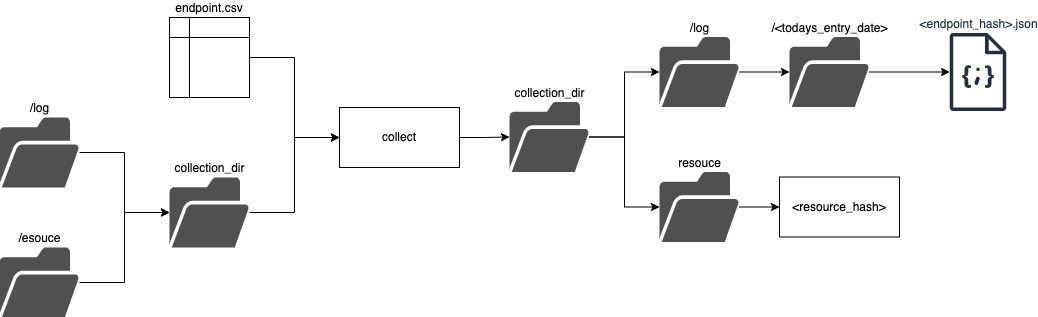
The collect process takes a csv which should correspond to the Endpoint dataset specification and a single directory in which two outputs are recorded:
- log - a log json file is created, named after the hash of the endpoint which was checked. It is added into a
logdirectory. This directory is partitioned byentry-date. - resource - a file (could be any format) named after the hash of the contents of a file. This data file will always be referred to as this in our system.
digital-land-python
The collect process uses a small amount of code from digital land python. The command found in the commands.py file. The command offers a functional way of collecting resources but the heavy lifting is done by the Collector class found in collect.py.
Batch Implementation
This process is run as part of our data collection pipelines.
They are run during a task in our collection DAGs in Airflow. The file generating these dags can be found here.
The airflow triggers an ECS task in fargate and uses the collection-task repository
The script for all processes run in the ECS task is run.sh
In that script the make collect target is used which leads to the digital-land cli:
digital-land ${DIGITAL_LAND_OPTS} collect <ENDPOINT_CSV> --collection-dir <COLLECTION_DIR>)
The argument options are passed in by setting environment variables. Defaults are chosen via make if not set.
Once complete results are pushed to s3 and saved using another make target
dynamic implementation
Run as part of the following tasks:
- check_url